Deep Sleep Course: how it sounds
How Deep Sleep Course is built: layered binaural beats from 0.5 to 10 Hz on carriers from 37 to 402 Hz, session by session, with the research behind the method and an honest summary of the evidence.
How this course sounds — the science
Every session is a layered binaural program: several tone pairs, one tone of each pair per ear, over a soft noise bed. The numbers below come straight from the session designs.
The course in numbers
- Beats from 0.5 to 10 Hz, covering the delta, theta, alpha bands.
- Carrier tones from 37 to 402 Hz.
- Up to 4 tone pairs sound at once.
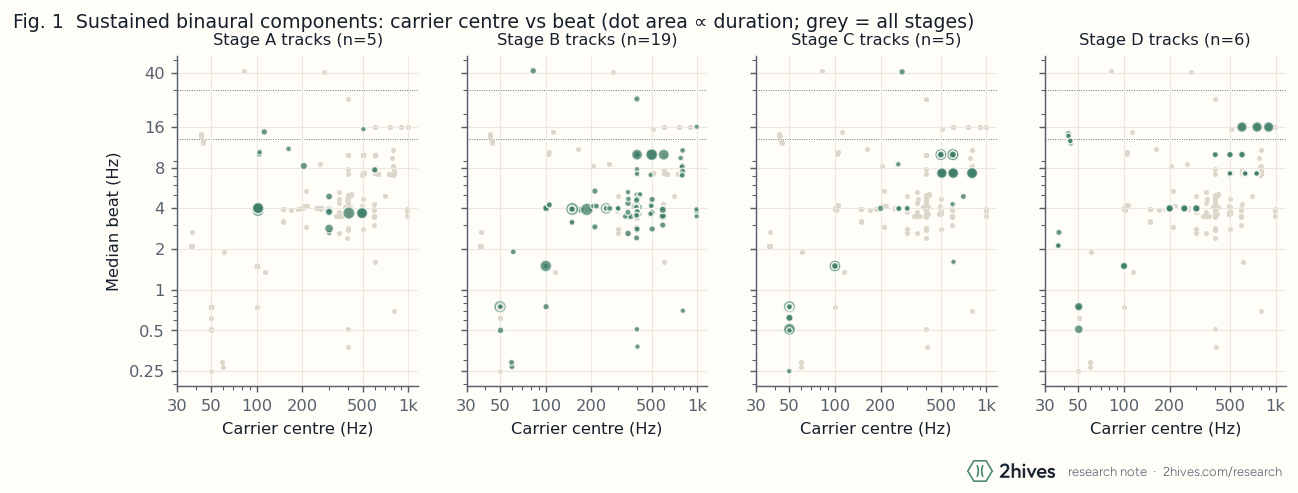
- Slower beats sit on lower carriers in 45 of 72 pair comparisons, the ordering measured in the reference set.
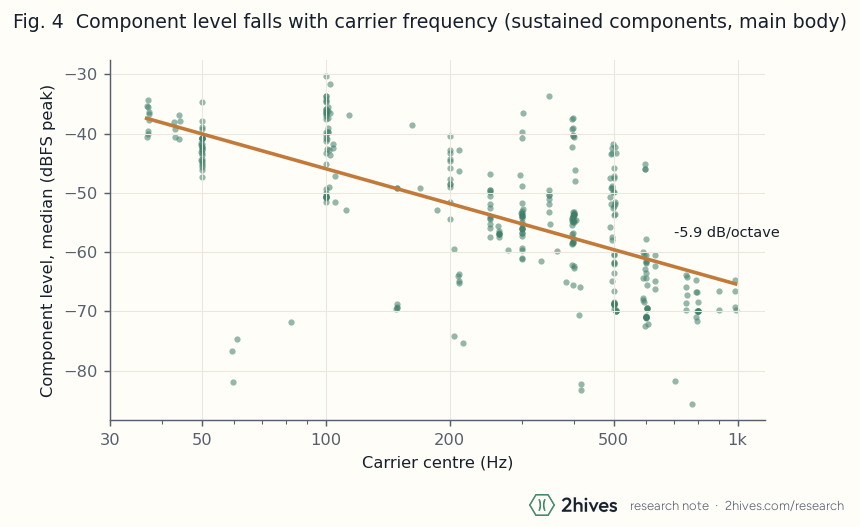
- Tone level changes by -4.7 dB per octave of carrier, so the higher tones sit quieter.
- Noise bed: brown, independent in each ear. Its level and brightness move on a slow 10-second cycle.
Tuning and carriers
The Tuning setting in the editor re-pitches the carrier tones and never the beats.
- Standard: carriers from 38 to 404 Hz, as designed.
- A=432 Hz: every carrier 31.8 cents lower, from 37.4 to 396.2 Hz.
- Solfeggio: carriers snap to 174, 285, 396 Hz inside their own range; the lowest and highest carriers keep their pitch.
Tunings and tones are offered as sound to explore, with no promise of effects. Read what the research says about frequencies.
The method
The sessions use the layered binaural method described in our research note. We measured a reference set of guided programs and generate every bed from those statistics, never from a recording.
- Carrier–beat ordering: slow beats ride on low carriers and faster beats on higher ones, and each tone's level falls with carrier frequency (stacking and level).
- Each phase moves the stack to a new band and crossfades smoothly into it (beats by stage).
- A noise bed shaped to the measured spectrum keeps the tones soft and masks small sounds around you (noise).
- The voice sits about 12 dB above the bed, and gentle mastering leaves the stereo beats intact (how your audio is made).
Session by session
Deep Sleep · 45 min
| Phase | Minutes | Band | Beats (Hz) | Carriers (Hz) | Tone pairs | Noise (dBFS) |
|---|---|---|---|---|---|---|
| Settle | 3 | alpha | 8, 10 | 155, 304 | 2 | -41 |
| Unwind | 6.5 | theta | 3.75, 3.9, 4 | 102, 198, 302 | 3 | -41 |
| Descend | 9.7 | delta | 1.5, 2, 3.75, 3.9 | 102, 151, 199, 302 | 4 | -41 |
| Deep Night | 12.9 | delta | 0.75, 1, 1.5, 2 | 50, 151, 199, 250 | 4 | -40 |
| Fade | 6.5 | delta | 0.75, 1, 1.5 | 50, 151, 250 | 3 | -44 |
| Hush | 6.5 | delta | 0.75, 1.5 | 50, 151 | 2 | -48 |
Sleep 2 · Unwinding · 30 min
| Phase | Minutes | Band | Beats (Hz) | Carriers (Hz) | Tone pairs | Noise (dBFS) |
|---|---|---|---|---|---|---|
| Settle | 3 | alpha | 8, 10 | 155, 304 | 2 | -40 |
| Set-Down Shelf | 10.1 | theta | 3.75, 3.9, 4 | 102, 202, 302 | 3 | -40 |
| Sink | 6.8 | delta | 1.5, 2, 3.75 | 151, 201, 302 | 3 | -41 |
| Sleep | 10.1 | delta | 0.75, 1.5 | 50, 151 | 2 | -45 |
Sleep 3 · The Melting Scan · 45 min
| Phase | Minutes | Band | Beats (Hz) | Carriers (Hz) | Tone pairs | Noise (dBFS) |
|---|---|---|---|---|---|---|
| Settle | 3 | alpha | 8, 10 | 155, 254 | 2 | -40 |
| Melt | 14 | theta | 0.75, 3.75, 3.9, 4 | 50, 102, 252, 302 | 4 | -39 |
| Pool | 14 | delta | 0.75, 1.5, 2 | 50, 121, 201 | 3 | -40 |
| Sleep | 14 | delta | 0.5, 1.5 | 45, 121 | 2 | -44 |
Sleep 4 · The Velvet Stair · 45 min
| Phase | Minutes | Band | Beats (Hz) | Carriers (Hz) | Tone pairs | Noise (dBFS) |
|---|---|---|---|---|---|---|
| Settle | 3 | alpha | 8, 10 | 155, 254 | 2 | -41 |
| Melt | 3.8 | theta | 3.75, 3.9, 4 | 102, 202, 302 | 3 | -40 |
| Velvet Stair | 7.6 | theta | 0.5, 3.5, 3.9, 4 | 45, 102, 302, 402 | 4 | -40 |
| Landing | 11.5 | delta | 0.5, 1.5, 2 | 45, 100, 201 | 3 | -41 |
| Deep Night | 11.5 | delta | 0.5, 1.5 | 45, 100 | 2 | -43 |
| Hush | 7.6 | delta | 0.5, 1.5 | 45, 100 | 2 | -48 |
Sleep 5 · The Whole Night · 60 min
| Phase | Minutes | Band | Beats (Hz) | Carriers (Hz) | Tone pairs | Noise (dBFS) |
|---|---|---|---|---|---|---|
| Settle | 4 | alpha | 8, 10 | 155, 304 | 2 | -40 |
| Shelf | 6.6 | theta | 3.75, 3.88, 4 | 102, 202, 302 | 3 | -40 |
| Melt | 6.6 | theta | 0.75, 3.75, 3.88, 4 | 50, 102, 252, 302 | 4 | -39 |
| Velvet Stair | 6.6 | delta | 0.5, 1.5, 2 | 45, 100, 201 | 3 | -41 |
| Night Tide | 16.5 | delta | 0.5, 1.5, 2.12 | 37, 45, 100 | 3 | -42 |
| Fade | 9.9 | delta | 0.5, 1.5 | 45, 100 | 2 | -45 |
| Hush | 9.9 | delta | 0.5, 1.5 | 45, 100 | 2 | -50 |
What you'll practise
- Set-Down Shelf — Place the day's thoughts one by one on a shelf beside the bed, where they wait until morning.
- Melting Scan — The body softens like warm wax, region by region, and pours into the bed.
- Velvet Stair — A soft, dark staircase counted slowly downward into held stillness.